
Cisco Secure Firewall
Chapter Overview
In today’s interconnected digital landscape, the firewall remains the cornerstone of network security. Merely blocking traffic based on port numbers is no longer sufficient. Modern enterprises require intelligent, adaptable, and integrated security solutions that can identify, block, and remediate sophisticated attacks across the entire attack continuum.
Cisco Secure Firewalls offer a comprehensive set of capabilities that extend far beyond basic packet filtering — including application visibility and control (AVC), intrusion prevention systems (IPS), URL filtering, and advanced malware protection (AMP). Understanding these integrated features is crucial for building a resilient security posture. We will examine how these solutions are deployed, configured for high availability, and leverage global threat intelligence to proactively defend against emerging threats.
Core Concepts
Cisco Secure Firewall Evolution and Next-Generation Capabilities
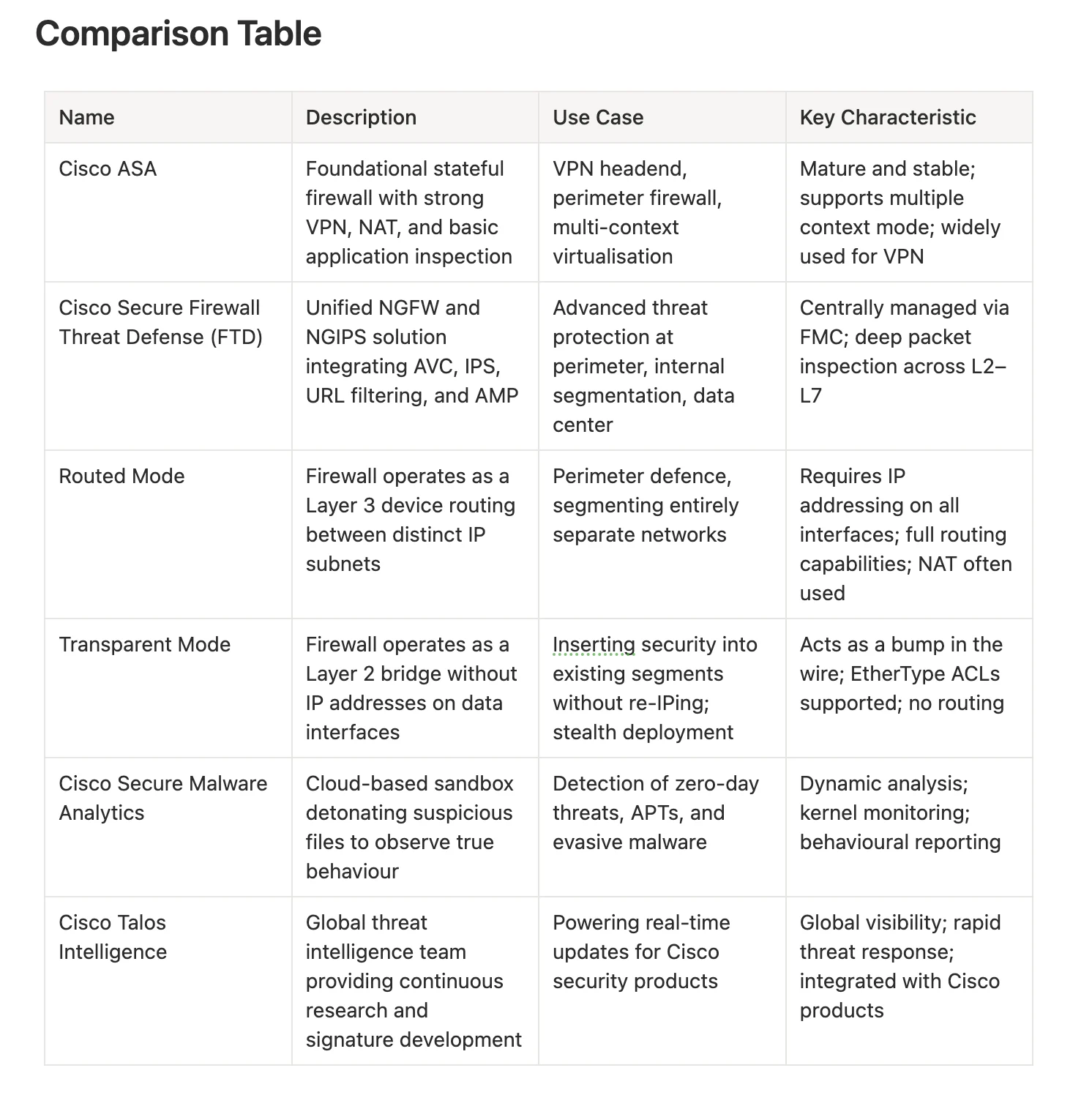
Modern Cisco Secure Firewalls have evolved from the classic ASA stateful firewall to the unified Firewall Threat Defense (FTD) platform. FTD integrates both NGFW and NGIPS capabilities in a single image, managed centrally by Cisco Firepower Management Center (FMC). This evolution delivers deep packet inspection across Layers 2–7, application awareness, and integrated threat intelligence — capabilities that traditional stateful firewalls simply cannot provide.
💡 Real-world Example: A traditional ASA firewall blocks traffic based on IP addresses and TCP/UDP ports. An FTD deployment goes further — inspecting the actual application within a session, detecting an attacker using port 443 for command-and-control traffic disguised as HTTPS, and blocking it based on application behaviour and threat intelligence rather than just the port number.
Deployment Modes
Cisco Secure Firewalls support several deployment modes:
- Routed mode (Layer 3) — the firewall acts as a router between subnets, requiring unique IP addresses on each interface.
- Transparent mode (Layer 2) — the firewall acts as a bridge, inserting security inspection without requiring IP address changes on existing devices.
- Multiple Context mode (ASA only) — virtualises a single physical appliance into multiple independent firewall instances, each with its own policy.
💡 Real-world Example: A data center needs to segment traffic between application tiers but cannot afford a network outage to re-IP devices. Deploying the firewall in Transparent mode between the web and application servers allows immediate security enforcement without any changes to existing IP addressing.
High Availability and Clustering
To eliminate single points of failure, Cisco Secure Firewalls support:
- Active/Standby HA — one device actively processes traffic while a standby unit stays synchronised and ready to take over.
- Active/Active Clustering — multiple devices operate as a single logical unit, distributing traffic load and providing both redundancy and enhanced throughput.
💡 Real-world Example: A large e-commerce platform deploys two Cisco Firepower 4100 appliances in an Active/Active cluster. If one fails, the other immediately assumes its traffic. During peak seasons, load is distributed across both units — ensuring uninterrupted service and preventing performance degradation.
Access Control and Intrusion Policies
Access Control Lists (ACLs) define traffic permissions based on Layer 2 through Layer 4 attributes. Beyond basic ACLs, FTD integrates Next-Generation IPS (NGIPS) capabilities through Intrusion Policies — performing deep packet inspection, signature-based detection, behavioural analysis, and anomaly detection to identify and block exploits that bypass traditional firewalls.
💡 Real-world Example: A compliance policy dictates that only IT administrators can SSH into production servers. An access control policy permits SSH from the admin subnet only. An associated Intrusion Policy simultaneously monitors those SSH sessions for brute-force attempts or suspicious command sequences — providing two independent layers of defence.
Cisco Secure Malware Defense
Cisco Secure Malware Defense, powered by Cisco Secure Malware Analytics, provides advanced protection against evasive and unknown malware. Suspicious files detected by the firewall are sent to a cloud-based sandbox for dynamic analysis — executing the file in an isolated environment, monitoring its behaviour, and identifying zero-day threats that static signature-based methods miss.
💡 Real-world Example: An employee downloads a phishing attachment. The firewall detects an unknown executable and submits it to Cisco Secure Malware Analytics. The sandbox observes it attempting to encrypt files and communicate with a command-and-control server, identifies it as ransomware, and generates an intelligence report — allowing the firewall to proactively block all future instances across the organisation.
Security Intelligence and Cisco Talos
Cisco Talos is one of the world’s largest commercial threat intelligence teams, constantly monitoring the global threat landscape, discovering new vulnerabilities, and creating detection rules. This intelligence is fed to Cisco Secure Firewalls through regular updates — ensuring devices have the latest signatures, URL categories, and behavioural indicators to detect and block emerging threats as soon as they appear.
💡 Real-world Example: A new ransomware campaign exploits a zero-day vulnerability. Cisco Talos develops new intrusion signatures and reputation blocks within hours and pushes updates to all subscribed Cisco Secure Firewalls worldwide. The organisation’s firewall automatically receives and applies these updates, gaining protection before the ransomware can reach internal systems.
Real World Analogy
✈️ Think of a Cisco Secure Firewall as an airport security operation. A traditional firewall is like a guard who only checks passports (IP addresses) and luggage size (ports). Cisco Secure Firewall Threat Defense is like a full airport security operation — checking passports and luggage, plus metal detectors (IPS for known attacks), full-body scanners (AVC to see what’s really inside traffic), a K9 unit for explosives (AMP for malware), and a special room for suspicious items (Cisco Secure Malware Analytics). This integrated system is continuously updated by global intelligence (Talos) about new threats and smuggling techniques.
Chapter Recap
This chapter explored the evolution of Cisco Secure Firewalls from the ASA to the unified Firewall Threat Defense (FTD) platform. FTD moves beyond stateful inspection to integrate AVC, IPS, URL filtering, and AMP in a centrally managed solution. Deployment modes (routed and transparent) and HA options (Active/Standby and clustering) provide architectural flexibility and resilience. Cisco Secure Malware Analytics and Talos intelligence complete the picture — providing dynamic sandboxing and real-time threat updates to keep defences current against an ever-evolving threat landscape.
Key Exam Points
- Cisco Secure Firewall (FTD) is Cisco’s primary NGFW, managed by Cisco FMC.
- FTD capabilities include Stateful Packet Inspection, IPS/IDS, AVC, URL Filtering, and AMP.
- Routed mode requires distinct subnets; Transparent mode acts as a Layer 2 bridge.
- Cisco ASA supports Multi-Context mode for logical firewall virtualisation on a single appliance.
- HA failover requires same firewall mode, software version, and FMC domain.
- ACLs use Access Control Entries (ACEs) to classify packets at L2, L3, and L4.
- Firepower Intrusion Policies include a network analysis phase before the intrusion prevention phase.
- Cisco Secure Malware Analytics provides dynamic sandboxing for unknown malware including kernel monitoring and behavioural capture.
- Cisco Talos provides real-time threat intelligence and signature updates.
- FirePOWER (uppercase) refers to the ASA module; Firepower (lowercase) refers to FTD unified software — a distinction tested on the exam.
Common Mistakes to Avoid
⚠️ FirePOWER ≠ Firepower — FirePOWER (uppercase) refers to the ASA FirePOWER Services module; Firepower (lowercase) refers to the FTD unified image. This distinction matters in the exam.
⚠️ Transparent mode cannot route — Transparent mode firewalls operate at Layer 2 and bridge segments. They cannot route traffic between subnets — an external router is required for Layer 3 forwarding.
⚠️ Don’t forget the implicit deny — Every ACL ends with an implicit deny. Traffic that does not match a permit statement is dropped — always verify rule order and completeness.
⚠️ HA devices must match exactly — For functional HA or clustering, all devices must run identical software versions, firewall modes, and be in the same FMC domain.
⚠️ Access Control Policy ≠ Intrusion Policy — An ACP determines whether traffic is allowed or blocked. An Intrusion Policy performs deep inspection on traffic the ACP has already permitted — they are sequential, not interchangeable.