

When you hear or read about network automation, Python and Ansible will undoubtedly be mentioned more than once.
In this tech blog, we will look at a concrete use of Ansible and how we can make use of it in a day to day scenarios. The aim is to create our 1st play-book and learn how to automate some of the tasks we deal with as network engineers.
Topology
I am using Cisco CML to build my test bed. My lab consists of 2 routers R1 & R2, then a switch which sole purpose is to connect the routers to my external connection. External connector will be set to System Bridge (not NAT) , so I can reach R1 & R2 from my home LAN and push play-book.
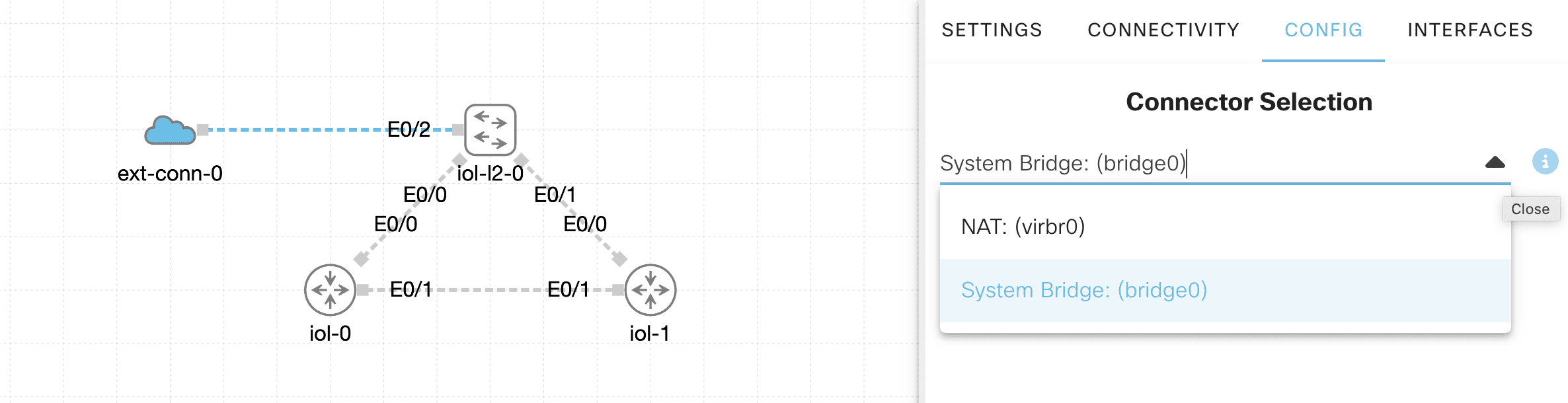
Base configuration
My base configuration is simple, and just enough to be able to ssh to R1 and R2 from my LAN. For this, I set E0/0 IP address as assigned by dhcp. Then created a local user and password, I can refer to for ssh sessions, as per following templates.
Below is added to both R1 and R2.
interface Ethernet0/0
 ip address dhcp
!
enable secret cisco
!
username cisco secret cisco
!
line vty 0 4
 login local
 transport input ssh
!
For specific ssh configuration, we add following:
R1(config)#ip domain name NL.com
R1(config)#ip ssh version 2
Please create EC or RSA keys to enable SSH (and of atleast 2048 bits for SSH v2 in case of RSA).
!
R1(config)#crypto key generate rsa modulus 2048
The name for the keys will be: R1.NL.com

% The key modulus size is 2048 bits
% Generating 2048 bit RSA keys, keys will be non-exportable...
[OK] (elapsed time was 1 seconds)

R1(config)#
*Aug 15 18:04:40.881: %PARSER-5-HIDDEN: Warning!!! ' crypto key generate rsa modulus 2048' is a hidden command. Use of this command is not recommended/supported and will be removed in future.
*Aug 15 18:04:41.262: %CRYPTO_ENGINE-5-KEY_ADDITION: A key named R1.NL.com has been generated or imported by crypto-engine
*Aug 15 18:04:41.262: %SSH-5-ENABLED: SSH 2.0 has been enabled
*Aug 15 18:04:41.697: %CRYPTO_ENGINE-5-KEY_ADDITION: A key named R1.NL.com.server has been generated or imported by crypto-engine
Let’s validate and check IP addresses assigned to R1 and R2 via DHCP. This would be my LAN router assigning addresses in the same range as my Mac or PC.

1st Ansible Play Book
We will take baby steps and start with a simple play book which ssh, logs in to R1 and does a "show version" command. My list of hosts is stored in an external txt file, devices.txt. This gives me flexibility to make changes without risk corrupting my playbook.
Once playbook is executed, a file is generated and saved to my local folder and named 192.168.86.24.txt with "show version output".
The flow should be as follows:
- Ansible targets local hosts, at this point no connection is made.
- Read each line in devices.txt
- Create dynamic hosts with credentials.
- Target destination host, ssh, login.
- execute command and return output.
Here is my playbook NL1.yaml
# Ansible playbook to SSH to Cisco devices and save output to individual files
---
# PLAY 1: Create dynamic inventory from devices.txt file
- hosts: localhost  # Run this play on the local machine
  tasks:
    # Read each line from devices.txt and create host entries
    - add_host:
        name: ""                    # Use IP address as hostname
        groups: cisco_routers                 # Add to cisco_routers group
        ansible_host: ""            # Set connection IP
        ansible_network_os: cisco.ios.ios     # Specify device OS type
        ansible_user: cisco                   # SSH username
        ansible_password: cisco               # SSH password
        ansible_connection: network_cli       # Use network device connection
      with_lines: cat devices.txt             # Read from devices.txt file

# PLAY 2: Connect to Cisco devices and execute commands
- hosts: cisco_routers     # Target all devices in cisco_routers group
  connection: network_cli  # Use network device connection method
  tasks:
    # Execute show version command on each device
    - cisco.ios.ios_command:
        commands:
          - show version     # Command to run on each device
      register: output       # Save command output to variable

    # Write each device's output to separate file named .txt
    - name: Write output to individual files
      delegate_to: localhost          # Run file operation on local machine
      copy:
        content: ""    # Command output content
        dest: "./.txt"  # Filename: IP_ADDRESS.txt
Running the playbook
My devices.txt file is a simple file with R1 IP address 192.168.86.24
Running the playbook with syntax:ansible-playbook NL1.yaml results in following results or output.

Using CSV file
Now that we confirmed our playbook works, our next step is to build on it and scale to more nodes. I will create a new file, this time it will be a csv file. The aim is to get show version output for all devices in the list, and use their hostname to create the output. this will show as R1.txt and R2.txt.
host,ip
R1,192.168.86.24
R2,192.168.86.25
Then the new playbook:
# Ansible playbook to SSH to Cisco devices and save output to individual files
---
# PLAY 1: Create dynamic inventory from devices.txt file
- hosts: localhost  # Run this play on the local machine
  tasks:
    # Read CSV file without headers
    - name: Read devices CSV file
      read_csv:
        path: devices.csv
        fieldnames: ['hostname', 'ip']  # Define column names manually
      register: device_list

    # Create host entries for each device from CSV
    - add_host:
        name: ""           # Use hostname as identifier
        groups: cisco_routers                 # Add to cisco_routers group
        ansible_host: ""         # Set connection IP from CSV
        device_hostname: "" # Store hostname for filename
        ansible_network_os: cisco.ios.ios     # Specify device OS type
        ansible_user: cisco                   # SSH username
        ansible_password: cisco               # SSH password
        ansible_connection: network_cli       # Use network device connection
      loop: ""          # Loop through CSV data

# PLAY 2: Connect to Cisco devices and execute commands
- hosts: cisco_routers     # Target all devices in cisco_routers group
  connection: network_cli  # Use network device connection method
  tasks:
    # Execute show version command on each device
    - cisco.ios.ios_command:
        commands:
          - show version     # Command to run on each device
      register: output       # Save command output to variable

    # Write each device's output to separate file named .txt
    - name: Write output to individual files
      delegate_to: localhost          # Run file operation on local machine
      copy:
        content: ""    # Command output content
        dest: "./.txt"  # Filename: HOSTNAME.txt
Conclusion
Now, we do have a working template, we can simply either modify out csv files to add new hosts, or modify the playbook to run different commands.